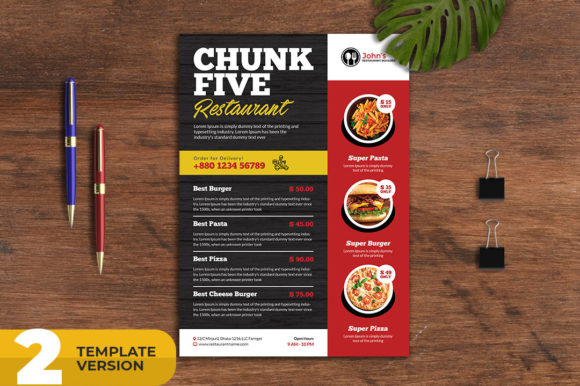
Restaurant Food Menu Flyer Pack
Creating consistent, professional marketing materials for a food business can feel like an endless task. Between menu updates, seasonal promotions, and daily social media posts, the demand for fresh visuals rarely lets up. Restaurant Food Menu Flyer Pack addresses this need directly by providing a structured, editable template system that works across both print and digital channels. Rather than starting from scratch each time, you work from a cohesive foundation that maintains brand continuity while allowing for quick customization.
What Makes the Restaurant Food Menu Flyer Pack Worth Considering
This pack combines two essential formats into one unified resource: an A4 print flyer with full bleed and a 1080x1080 pixel social media banner. Both are built from the same design language, which means your print materials and online posts share a consistent visual identity. For anyone running a restaurant, cafe, food delivery service, or fast-food operation, this eliminates the disjointed look that often appears when print and digital materials are designed separately.
The template is delivered as a layered PSD file. Layers are organized in a logical structure, and images can be replaced through smart object layers. This approach simplifies the editing process significantly. You do not need to dig through dozens of unnamed layers or reconstruct the file to swap a photo. The smart object workflow keeps the original design intact while allowing you to insert your own imagery without distorting the layout.
Core Features and Functional Strengths
The print flyer is set to A4 paper size with a 5mm bleed. It uses CMYK color mode at 300 DPI, which is the standard for professional printing. If you have worked with print materials before, you know that incorrect color mode or insufficient resolution leads to disappointing results on paper. This template removes that risk by starting with the right specifications. The 5mm bleed gives your printer enough margin to trim cleanly without cutting into your content.
The social media banner is sized at 1080x1080 pixels, the standard square format for Instagram and Facebook posts. It uses RGB color mode, which is appropriate for digital screens. Having both CMYK and RGB versions prepared correctly saves time and prevents the color shifting that can occur when converting between modes.
Fonts used in the template are free, which means you can download and use them without additional licensing costs. A help file is included, providing guidance on customization steps. If you run into specific issues with color adjustments or text updates, the creator offers support through their profile page.
Practical Applications Across Marketing Channels
One of the strongest aspects of Restaurant Food Menu Flyer Pack is its versatility across different media. You can use the print flyer for traditional advertising such as magazine ads, newspaper placements, promotional posters, direct mail pieces, or takeout menus. The A4 size works well for inserts, table tents, and in-store displays. Because the file is fully editable, you can adjust the layout slightly for different purposes without needing to rebuild from scratch.
The social media banner serves as a first impression tool on platforms like Facebook and Instagram. Whether you are posting a daily special, announcing a new menu item, or running a limited-time offer, the banner format gives you a ready-made canvas. You can also use it for Instagram Stories by adapting the square composition, though the primary format is optimized for feed posts.
For food delivery services, having a consistent visual identity across your website, social media, and printed materials builds trust with customers. When they see the same design language on a flyer slipped under their door and on your Instagram post, it reinforces recognition. This pack makes that consistency achievable without hiring a designer for every single piece.
Quality, Usability, and Design Considerations
The layered PSD structure is organized with editing efficiency in mind. Smart object layers for images mean you can replace a photo by double-clicking the layer thumbnail, placing your new image, and saving. The file automatically updates the main composition. This is a standard practice in professional template design, and its inclusion here indicates attention to workflow practicality.
Color settings are print-ready for the flyer and screen-optimized for the banner. If you plan to use both formats together, you will need to be mindful of how colors appear across media. CMYK and RGB gamuts differ, and some colors that look vibrant on screen may appear duller in print. This is not a limitation of the template itself, but a reality of cross-media design. Testing a small print run before committing to a large batch is always advisable.
The free fonts are a practical choice. Many template packs rely on premium fonts that require separate purchases, which adds hidden costs. Here, you can download the fonts and begin working immediately. However, you may choose to substitute them with your own brand fonts if your business has established typography guidelines. The layered file makes font substitution straightforward.
Who Benefits Most From This Template Pack
Restaurant owners and managers running day-to-day marketing efforts will find this pack directly useful. If you handle promotions, menu updates, and social media posting yourself, having a template that reduces design time is a clear advantage. The same applies to cafe owners, food truck operators, and small fast-food chains that need frequent materials but lack a dedicated design team.
Marketing professionals and freelancers working with food and beverage clients can use this pack as a starting point for campaign assets. Rather than building each deliverable from scratch, you can adapt the template to fit client branding and scale production across multiple locations or promotions. The organized layer structure also makes it easier to hand off files to clients who may need to make future updates themselves.
Entrepreneurs launching a new food concept can benefit from the professional finish without a large upfront investment in custom design. If you are testing a pop-up, opening a first location, or launching a delivery service, this pack gives you a polished look from day one. As your business grows, you can invest in more custom branding while still using the template for routine materials.
Creators and bloggers in the food space can adapt the social media banner for recipe posts, brand collaborations, or event announcements. The square format aligns with standard social media requirements, and the design style is flexible enough to work with different photographic approaches.
Realistic Examples of Effective Use
Consider a neighborhood pizzeria that rotates weekly specials. With this pack, the owner can update the flyer each Monday with the new offer, print a stack for in-store tables, and post the same design on Instagram within minutes. The consistency between the physical and digital versions reassures customers that the information is current and reliable.
A food delivery service preparing for a holiday promotion can use the flyer for door drops and the banner for targeted ads. The same design language across channels increases recall. If the promotion runs for two weeks, the layered file makes it easy to swap dates or fine print without disrupting the overall layout.
A freelance marketer managing social media for several restaurant clients can maintain separate template files for each brand, customizing colors, fonts, and images according to the brand guidelines. The help file and support option reduce the time spent troubleshooting file issues, which is valuable when client deadlines are tight.
Possible Limitations and How to Work Around Them
No template is a one-size-fits-all solution, and this pack has practical boundaries worth noting. The design direction is general enough to suit most food businesses, but it may not align perfectly with very specific brand aesthetics. If your brand uses an unconventional layout, specific color palette, or non-standard typography, you will need to invest time in customization. The layered file gives you the flexibility to make those changes, but the result will depend on your design skills.
The social media banner is sized for square feed posts. If you need vertical Stories or horizontal Twitter headers, you will need to adapt the design yourself. The print flyer is A4 portrait, which is a standard size, but if you require different dimensions for specific advertising placements, some cropping or reshaping will be necessary.
Users who are not familiar with Photoshop may find the layered PSD format challenging at first. While the smart object workflow is user-friendly compared to flat files, it still requires basic knowledge of layers, layer groups, and file saving conventions. The included help file addresses this, but absolute beginners may need to spend some time learning the basics before achieving polished results.
Color differences between digital and print outputs can be surprising if you do not calibrate your monitor or soft-proof in Photoshop. The template provides the correct color modes, but final print quality also depends on your printer, paper stock, and color settings. Requesting a physical proof from your print shop before running a large batch is a standard precaution.
Final Observations on Long-Term Value
Restaurant Food Menu Flyer Pack provides a practical bridge between print and digital marketing for food-related businesses. Its layered PSD structure, print-ready specifications, and organized workflow make it a resource you can return to repeatedly as your menu changes, seasons shift, and promotions evolve. The inclusion of both CMYK and RGB versions in the appropriate sizes reduces the friction that often comes with managing multiple file formats.
The pack is especially valuable for small and medium-sized operations where marketing budgets are not unlimited, but professional presentation remains important. By removing the need to design each piece from scratch, it frees up time for other aspects of running the business. The support option through the creator's profile page adds a layer of reliability that can save hours of frustration if you encounter technical issues.
If you are looking for a way to streamline your restaurant's visual marketing while maintaining quality across both print and social media, this pack is worth examining closely. It does not promise to replace a full branding agency, but it does deliver what templates should: a solid, editable foundation that respects your time and your need for professional results.