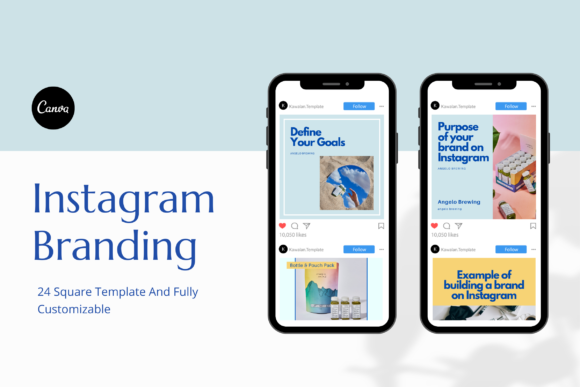
Evaluating a Branding Template Pack for Your Social Media Presence
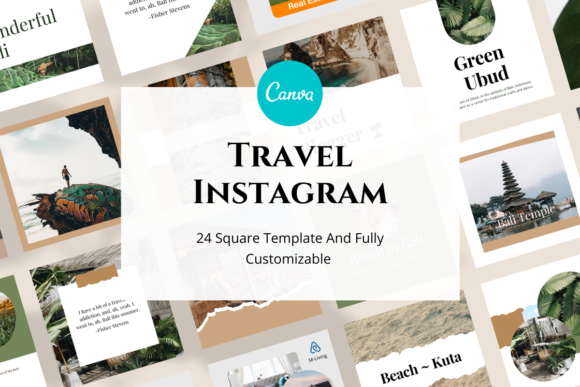
Building a consistent visual identity across social media can feel like a chore, especially when you are juggling content creation, client work, and daily operations. A branding template pack aims to simplify this process by offering a set of pre-designed layouts you can customize for your posts. The Branding Template and Branding Canva Instagram Template pack is one such option, providing 24 square-sized templates built directly in Canva. This article walks through what this template pack offers, how it compares with other approaches to social media branding, and what factors might influence whether it fits your specific needs.
What the Branding Template Pack Includes
At its core, this product is a collection of 24 Instagram square post templates, each sized at 1080 by 1080 pixels. They are created in Canva, which means you can edit them directly in your browser without needing specialized design software. The pack comes with a PDF file containing a link to the Canva template folder. From there, you can change photos, fonts, shapes, background colors, and all text elements. Importantly, the templates use free Canva fonts, so you do not need to upload or purchase any additional typefaces. You also do not need a Canva Pro subscription to edit these designs, as they work with a free Canva account. Note that stock images are not included with the pack, so you will need to supply your own photos or source them separately.
What makes this pack distinct is its focus on personal branding, coaching, and small business needs. The term branding template here refers to a cohesive set of layouts that share consistent color schemes, typography, and structural elements. Rather than starting each post from scratch, you can apply your own content to a framework that already aligns with a certain visual style. This can save time and help maintain a recognizable look across your feed.
How Template Packs Compare to Other Branding Approaches
When you evaluate a branding template pack like this one, it helps to understand the broader landscape of options available for creating a consistent social media presence. The choice often comes down to how much control you want, how much time you can invest, and what budget you are working with.
Custom Design from a Professional
Hiring a graphic designer or brand strategist to create a full visual identity and a set of custom templates is the most tailored route. A professional can study your audience, your industry, and your brand voice to produce something unique. The result is often a more distinctive look that stands out from templates others might be using. However, this option typically costs more and involves back-and-forth revisions. For a coach or small business owner testing a new offer or building a side venture, the investment might be hard to justify early on. A branding template pack offers a middle ground: you get a cohesive set of layouts at a fraction of the cost, and you retain the freedom to personalize them.
Designing from Scratch on Canva
Starting with a blank canvas in Canva gives you total creative control. You can choose every font, color, and layout element according to your taste. The tradeoff is time. Building 24 distinct yet cohesive post designs from scratch can take many hours, especially if you are not experienced with design principles like hierarchy, spacing, or color theory. The Branding Template pack essentially gives you a head start. The structural decisions are already made, so you can focus on swapping in your own text and images. For someone who wants a polished look quickly without learning design from the ground up, this is a practical shortcut.
Using Other Pre-Made Template Packs
There are many template packs available online, both free and paid, for platforms like Canva, Adobe Express, or even PowerPoint. Some are focused on specific niches like quotes, promotions, or product showcases. Others are more general. What can set one pack apart from another is the level of consistency across templates, the quality of the initial design choices, and how much editing flexibility you have. The 24-template pack described here emphasizes easy customization and free fonts, which lowers the barrier for entry. If you compare it to a pack that requires Pro features or paid fonts, this one may be more accessible for users who do not want to upgrade their Canva account.
Strengths and Practical Benefits
One clear strength of this template pack is its simplicity. The fact that you can edit everything with a free Canva account removes a significant hurdle. Many small business owners and coaches are already familiar with Canva, and being able to work within that environment without extra costs is convenient. The square format is also well suited to Instagram's feed and works for profile posts, carousel covers, and even some advertising placements.
Another advantage is the number of templates. Having 24 layouts means you are unlikely to exhaust them quickly. You can rotate through designs for different types of content, such as announcements, tips, testimonials, or event promotions. This variety helps your feed feel dynamic while still looking unified. Because all templates share a common design language, your audience will start associating that look with your brand over time.
The use of free Canva fonts is a thoughtful detail. Font licensing can be confusing, and some packs rely on premium fonts that users must purchase separately. By sticking with fonts available in the free Canva library, the pack ensures that every user can replicate the designs exactly as intended without extra steps.
Tradeoffs and Limitations
No template pack can fit every situation perfectly, and it is worth considering where this one might fall short for certain users. The most notable limitation is that stock images are not included. You will need to supply your own photography or source images from free or paid libraries. For someone who does not have a collection of brand-ready photos, this adds an extra task before the templates can be used effectively. Some users might prefer a pack that comes with placeholder images they can replace gradually.
Another tradeoff relates to uniqueness. While you can customize colors, fonts, and text, the underlying layout structures are fixed. If another business in your niche purchases the same pack and uses similar customization choices, there could be a resemblance in the visual structure of your posts. This is true for any template-based approach. The degree to which this matters depends on your industry and how saturated the visual landscape is. For a local service provider or a coach with a specific personal story, the risk of looking generic can be mitigated by using strong, distinctive photography and a unique brand voice.
The square format is ideal for Instagram feed posts, but it may not translate perfectly to other platforms. If you plan to repurpose content for Facebook, Pinterest, LinkedIn, or story formats, you may need to do additional resizing or create separate variations. Some template packs include multiple aspect ratios, but this one is focused squarely on Instagram square posts. That is a focused strength, but also a limitation if your strategy spans several social channels.
When This Template Pack Makes Sense
The Branding Template pack is a strong match for a few common scenarios. If you are a coach just starting to build an online presence, you likely need to produce content consistently while keeping costs low. A set of ready-made templates lets you focus on writing captions and planning your content calendar rather than wrestling with design decisions. Similarly, a small business owner who handles marketing alone or with a very lean team can benefit from the time savings. Being able to create a polished post in 10 or 15 minutes, rather than an hour, frees up energy for other priorities.
Another good fit is someone who already has a collection of brand photos or a clear visual identity in mind. If you know your brand colors and have a library of images, the templates give you a quick way to apply that identity consistently. The customization options allow you to match the templates to your existing palette without being locked into a specific scheme.
There is also a scenario where you want to test a new brand direction without committing to a full rebrand. Because the templates are easy to update, you can try a different color combination or font pairing for a few weeks and see how your audience responds. If you decide to pivot, you simply adjust the template settings rather than redoing everything from scratch.
When Another Option Might Serve You Better
If your brand relies heavily on a very specific visual identity that includes custom illustrations, unique typography, or complex layouts that go beyond what template structures allow, a custom design approach may be necessary. Template packs work best within certain design constraints, and pushing them too far can lead to awkward spacing or compromised aesthetics.
For users who need multi-format content, such as stories, landscape thumbnails for YouTube, and vertical pins for Pinterest, a single pack focused on square posts might feel limiting. In that case, you might look for a pack that offers multiple aspect ratios, or invest time in learning how to adapt the square layouts to other sizes yourself in Canva.
Also, if you have very little familiarity with Canva or design software in general, even a template pack requires some comfort with basic editing tools like replacing images, adjusting text layers, and tweaking colors. While the learning curve is low, it is not zero. Someone who prefers a fully managed service, where a designer creates and posts content on their behalf, would be better served by a done-for-you social media management arrangement.
Key Decision Factors to Consider
When deciding whether this branding template pack aligns with your needs, think about the following points:
- Time investment: How much time are you willing to spend on design each week? If you want to minimize design time, a template pack is a strong shortcut. If you enjoy crafting custom layouts and have the hours available, starting from scratch could yield a more original result.
- Budget: Compare the cost of the pack against the cost of hiring a designer or purchasing a Pro subscription for advanced design features. This pack requires no Pro account, which keeps ongoing costs down.
- Content types: Look at the types of posts you typically create. Do you need quotation cards, product showcases, before-and-after comparisons, or event announcements? The pack includes 24 templates, but understanding what those layouts are designed for will tell you if they cover your recurring needs.
- Visual consistency: How important is it that every post looks like it belongs to the same brand? Template packs inherently support consistency because the frameworks are shared across templates. If you tend to deviate from a coherent style when designing ad hoc, a template pack can act as a guardrail.
- Future scalability: As your business grows, you might outgrow a single template pack. That is normal. The question is whether the pack serves your needs for the next six to twelve months. If you anticipate needing more variety or different formats soon, factor that into your choice.
Practical Example of Using the Templates
Imagine you are a wellness coach who posts three times a week on Instagram. Without templates, you might spend two to three hours each week designing posts, adjusting colors, and trying to keep your feed looking cohesive. With the template pack, you can set aside one hour at the start of the month to customize the 24 templates with your brand colors, font preferences, and a few key images. After that initial setup, creating each week's posts involves opening a template, replacing the placeholder text with your new content, and swapping in a fresh photo. The design work is essentially done in advance, and you can maintain a consistent look even when you are short on time.
If you later decide to introduce a new service, such as group coaching sessions, you can dedicate one or two of the 24 layouts specifically for that offering. Because all text is editable, you can change headlines, add bullet points, and adjust calls to action without affecting the underlying structure. The flexibility to reuse and repurpose the same templates for different messages is where the value becomes most apparent.
Making an Informed Choice
Choosing a branding template pack is ultimately about balancing convenience, cost, and control. This particular pack offers a straightforward entry point for anyone who wants to elevate their Instagram presence without learning advanced design skills or investing in expensive software. It is not a complete brand strategy, nor does it replace the need for quality content and genuine audience engagement. What it does is remove a common friction point: the time and effort required to produce visually consistent posts week after week.
Before purchasing, take a moment to review your own workflow. If you find yourself avoiding social media posting because the design step feels overwhelming, a template pack can remove that barrier. If you already have a clear vision and simply need a faster way to execute it, this pack can serve as a productive starting point. And if you determine that your needs are more specialized, you will at least know what tradeoffs you are making by choosing a template-based approach over a custom solution.
Every branding tool has its place, and the right fit depends on where you are in your journey, what resources you have, and how you want your brand to come across. By understanding the strengths and boundaries of a product like this template pack, you can decide whether it supports your goals or whether you need to look further.