Music Stream App Mobile UI KIT: Build Better Apps Faster
When you are building a mobile application from scratch, the gap between an idea and a functional prototype can feel enormous. You need screens that look polished, flows that make sense, and a design language that feels coherent from onboarding to playback. That is exactly where the Music Stream App Mobile UI KIT steps in. This isn't just a collection of pretty screens — it is a complete, editable Figma system built to help designers, entrepreneurs, marketers, and content creators launch music streaming interfaces without starting from zero.
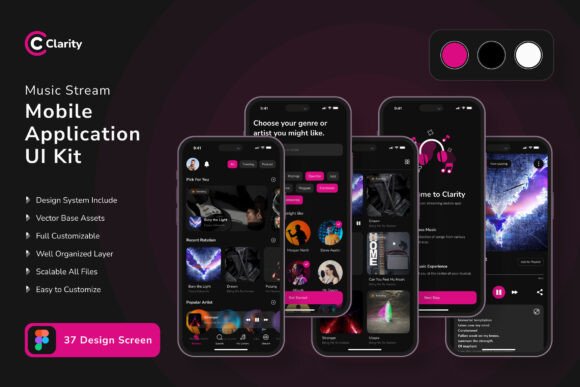
The kit includes 37 pixel-perfect screen designs, 80 UI elements, and over 100 vector layers, all organized and ready for customization. Whether you are a solo founder testing a concept or a design team under a tight deadline, this resource removes the repetitive grunt work and lets you focus on the user experience that matters.
What Makes This UI Kit Stand Out Visually
From a visual standpoint, the Music Stream App Mobile UI KIT carries a clean, modern aesthetic that avoids visual clutter. Screens are built with generous whitespace, clear typographic hierarchy, and a color palette that feels approachable rather than aggressive. The design leans toward a dark-mode-first look, which is standard for music streaming apps because it reduces eye strain during long listening sessions and makes album art pop.
Each template feels purposeful. The player screen, for instance, prioritizes the album artwork while keeping playback controls within easy thumb reach. Playlist views are structured so that track information is scannable, and navigation elements stay consistent across every screen. The use of 100% scalable vectors means you can resize, recolor, or reshape any element without losing quality — a practical advantage when adapting the kit for different screen sizes or branding needs.
The modern typography used throughout the kit is paired with a free font, which keeps your licensing simple. You are not locked into an expensive typeface just to match the mockups. If you prefer a different font pairing later, the layers are fully organized, so swapping out text styles takes minutes rather than hours.
How This Kit Helps Across Different Projects
If you are a designer or creative professional, the Music Stream App Mobile UI KIT works as both a starting point and a reference library. You can pull individual screens for client presentations, use the symbol objects to build out new features quickly, or hand off a consistent design system to developers. The 80 UI elements cover everything from buttons and sliders to search bars and progress indicators, so you rarely need to rebuild common components from scratch.
For marketers, brand strategists, and content creators, the value is a bit different. You can use these templates to produce high-fidelity prototypes for user testing, pitch decks, or social media previews without waiting on a design team. Imagine showing investors a realistic app flow that looks production-ready — that kind of visual proof can move conversations forward faster than wireframes ever could.
Crafters, hobbyists, and small business owners exploring app ideas will appreciate how little technical skill is required to get started. Because the kit lives entirely in Figma, you can open it, tweak colors to match your brand identity, replace placeholder images with your own assets, and export screens for development reference. The learning curve is shallow, especially if you have any experience with layer-based design tools.
Readability, Hierarchy, and User Engagement
Good app design is invisible. When a user opens a music streaming app, they should not have to hunt for the search bar or wonder how to add a song to a playlist. The Music Stream App Mobile UI KIT supports that kind of frictionless experience by establishing clear visual hierarchy on every screen. Album titles are larger and bolder than track durations. Primary actions like play and shuffle stand out against secondary controls. This implicit guidance helps users move through the app without conscious effort.
Readability also benefits from the kit's structure. Text elements sit on high-contrast backgrounds, and the chosen font maintains legibility even at smaller sizes — crucial for track lists and metadata lines. When you customize the kit, you can preserve this clarity by keeping line heights generous and avoiding overly decorative type for body text. The result is an interface that feels professional and trustworthy, which strengthens brand perception over time.
Consistency across screens builds recognition. When every button follows the same radius, every spacing rule repeats, and every icon matches in weight, users subconsciously learn the interface language. That reduces cognitive load and encourages longer engagement with your app. The kit's symbol objects and fully layered structure make it straightforward to maintain that consistency as you add new screens later.
Practical Guidance for Choosing and Using This Kit
Before you commit to any design assets, it is worth evaluating whether the visual style aligns with your brand goals. The Music Stream App Mobile UI KIT leans modern and minimal — perfect for startups, indie music services, podcast platforms, or even educational audio apps. If your brand identity calls for something more ornate or playful, you can still use the kit as a structural foundation and customize colors, corner radii, and iconography accordingly.
When testing font pairings, start with the free font included in the kit. It is designed to work with the screens, so the spacing and sizing are already dialed in. If you want to introduce a second typeface for headlines or branding elements, try pairing a neutral sans serif font for UI text with a more expressive option for logo or hero areas. Just be careful not to mix more than two fonts — the kit's clean layout works best with restraint.
Review the included styles carefully. The kit offers 37 screens, but not every app needs every screen. Pick the templates that match your core user flow — onboarding, home feed, search, player, playlist, and settings — and hide or delete the rest. This keeps your Figma file manageable and forces you to focus on the journey that matters most to your users.
Also consider commercial licensing. The kit itself is available for Figma with full editing rights, and the font is free to use. However, the preview images used in the demo are not included in the download, so plan to replace them with your own album art, artist photos, or illustrations. This is standard practice and gives you full control over the final look without unexpected licensing issues down the road.
Real-World Application Scenarios
Imagine you are a blogger launching a companion app for your music review site. You want something that feels credible but does not require a six-figure development budget. With the Music Stream App Mobile UI KIT, you can mock up a full experience — from sign-up to song playback — in a single afternoon. You then hand those screens to a developer as a visual spec, cutting down on back-and-forth revisions.
Or picture yourself as a small business owner running a local record store. You want an app where customers can preview new arrivals and build wishlists. The kit gives you a shopping-ready interface with search, browse, and favorites screens already laid out. You just swap the branding and populate the library with your inventory. It is fast, it looks professional, and it keeps your focus on the customer experience rather than pixel-pushing.
For design teams inside larger organizations, this kit can serve as a internal standard. Instead of each designer building navigation bars and player controls from scratch, everyone pulls from the same 80 UI elements. That consistency speeds up production and makes cross-project collaboration smoother. The 100 scalable vectors also mean you can adapt the kit for tablet layouts or even smartwatch concepts if your roadmap expands.
Getting the Most Out of the Kit
Because every layer is organized and labeled, you can change the global color style in minutes — not hours. Use Figma's local styles feature to swap between light and dark themes, or match your brand's exact hex values. The symbol objects update everywhere they are used, which eliminates the need to find and replace individual elements manually.
Take advantage of the free icon vector set included in the kit. Icons are small details that carry a lot of weight in mobile UI. Consistent iconography reinforces brand identity and helps users navigate without reading every label. The kit's icons are simple and neutral, so they will not clash with your chosen typeface or color palette.
Finally, remember that a UI kit is a tool, not a crutch. The best designs come from people who understand their users, test their assumptions, and iterate based on real feedback. The Music Stream App Mobile UI KIT gives you a strong, well-structured starting line — what you build from there is entirely up to you.